eufy Clean - Live Well. Live Smart. Control your eufy smart home devices from anywhere.
You can als
o share eufy smart home devices with family members, so everyone can set their own personal preferences for each device.
How to use eufy Clean:
-Note: For new products released after 2026 (such as C28, S2, etc.), please use the eufy app.
- Registering your account: After downloading the app, create and register an account with your Email address. (Or directly log in with your EufyLife account)
- Adding devices: Open the eufy Clean app and follow the intuitive setup procedure to pair new devices with your smartphone. If a device has already been setup by another family member, you can request control access to operate that device from that family member.
- Using devices: After successfully pairing the new device, it will show up in the device list. Simply tap the icon you wish to use and start enjoying the Eufy smart home experience.
Contact Us:
• Email: support@eufylife.com
• Website: eufylife.com
• Facebook: @EufyOfficial
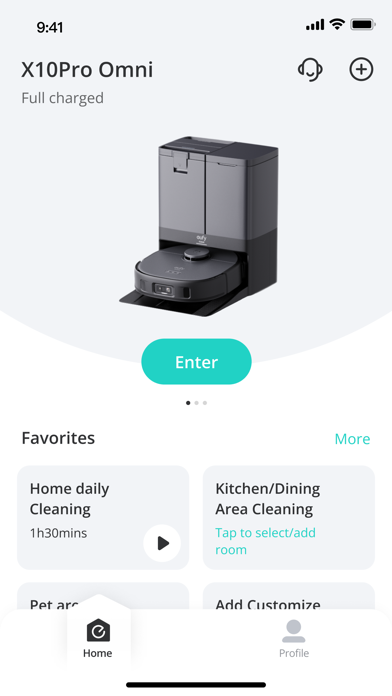
Screenshots of eufy Clean (EufyHome) iOS app
Reviews eufy Clean (EufyHome) for iphone
Map disappears
3
By THfromUsa
The app is fine except that every now and then it claims it doesn’t have a map - even though it loads initially and I can see it when I go into history and look at prior cleanings. But nothing shows under map management. This is very annoying.
X8 Pro
1
By Wifi connection sucks
This is the worst product and app ever.
Removed cleaning function during DND
1
By Josh101x
I had no issues with this app up until the most recent update. I had a schedule set for my vacuum to clean at 3am every night, but since it was on Do Not Disturb mode, it simply wouldn’t empty the dust after finishing the cleaning. Now, the app has suddenly removed that feature, making it so that the vacuum cannot clean at all if it is set on DND mode. This is absolutely pointless and completely negates the ability to clean at night. I will leave this review until this change has been reversed.
Lost account and password
2
By Watgo
Lost my account and password information. 39 minutes of struggling with this app and still no reset.
Eufy not recommended
2
By politicalresponsibility
Room division function is broken, vacuum frequently has problems when switching between maps, the vacuum frequently runs into objects it just mapped when navigating back to base station, the base station is sometimes bumped out of place by the vacuum causing it to not charge. But the real kicker is the advertisements on the app. There are banner ads, little gifts shaking around, and a new banner ad at the bottom of the vacuum control page. It’s positioned to be right in your face and right next to commands you’ll frequently use, apparently to get you to accidentally click it. If you do hit it, or try to hit the x to close the ad, the app becomes a web browser that has no apparent escape back to controlling your vacuum except to close the app and try again. This level of trying to get you to “upgrade”, when all the problems I have with the vacuum are software related (yes, I keep the vacuum clean) all point to a company value system that intentionally gives you a broken product over time and keeps a “deal” for a new product right where you’re bound to see it when you’re struggling with the vacuum. We also had a Eufy baby monitor give up after a year for no good reason. Never again, Eufy.
Update!
1
By Phoenix75
Oh my gawd please fix these glitches! The “ positioning successful” text box keeps popping up even when I x it out! Also why do I have to click the mode/customize every time I clean…shouldn’t it save it?!
No longer works
2
By BadWolf741
I loved the layout and ease of use. After the last update my vacuum (2 months old) will no longer connect to the internet.
Just Purchased Omni C20 Pro
4
By Unresponsive app
So far so good set everything up follow the instructions. Charged it all the way before running and double checked everything.
Seems to be that when it is mopping it starts off with wet scrubbers, but then they dry off as it moves on and it doesn’t disperse water as needed just scrubbing dry floor so read a few things online and it said to clean nozzles, but it’s brand new so I increased the water setting in the app and currently waiting for it to charge.
The mapping seems to be very good and has come a long way from my older model, but my only complaint is once you have a map. The customization features of the map are very poor. Doesn’t let you square off a room the way you would like or change the shape in your next update. Please add some more customizing features.
Will update soon
Latest Update Broke the Map Feature.
1
By Scramjett
The app is not working properly since the 1/2/2026 update. The robot has not been able to run because it can’t find the map even though I keep switching it back to the stored map. Even when I try to create a new map, it won’t store the new map at all. I even uninstalled and reinstalled the app and it’s still not working. Even though it still works with auto clean, I got this robot for the room and zone features. They are now useless without a functioning map. You need to fix your app.
New version bugged
1
By Hfxyinvjkhcbn
New version is bugged so it crashes when loading the map. Can't do room cleaning. Vac unusable.